


What should I do about AI in my class?

Each instructor should reflect on how they will discuss appropriate uses of AI with their students and in what ways they will integrate the technology into their course, if at all. University guidelines and standards are in development, but faculty make their own personal decisions about what to do. CTEI has facilitated conversations about how faculty are teaching students to use AI to prepare them for their future careers and how instructors can use the tools to assist in developing course materials (e.g., writing test questions, formatting rubrics). This page provides links to resources and information, questions to consider, and support available.
What tools are available?

Johns Hopkins Information Technology maintains a list of approved AI tools.
HopGPT (formerly Hopkins AI Lab) offers members of the Johns Hopkins community secure and easy access to Large Language Models (LLMs) from OpenAI, Anthropic, and Meta. HopGPT is secure environment with data protections built in and is provided without extra fees to faculty, staff, and students. If you’re not sure where to start with AI, HopGPT is a good first step.

Copilot is a Microsoft AI tool that is also available for JHU faculty, staff, and students. There are multiple versions of Copilot, including the free Copilot on the web version available to all users. Copilot on the web does not have the security protections of HopGPT, so sensitive data (like student information or assignment submissions) should not be uploaded. There is a paid version of Copilot that integrates with Office365 and does have data protections.
Many faculty maintain 3rd party accounts to tools like Gemini, or have personal subscriptions to ChatGPT or Claude. Hopkins sensitive data (student, PHI, PII) should not be used with personal subscriptions and we encourage faculty to explore the approved AI tools.
There are also numerous third-party tools available with more coming online weekly. CTEI staff are available to assist faculty in exploring them. One key consideration is that third-party tools are usually not FERPA compliant.
Prompting Tips
If you use AI to develop content, consider these suggestions for more productive prompts.
- Be specific
- Be detailed
- Give the LLM a role / Motivate it / Provide context
- Provide examples: one-shot/few-shot prompting
- Optional: Describe desired output/format
- Optional: Suggest (iterative) improvements
- Optional: Intentionally choose the LLM to prompt
What else should I consider?
Confabulations (also known as hallucinations) – Generative AI creates text, images, etc., but products of generative AI can include inaccuracies or misrepresentations. Your expertise in your subject area and as an educator are essential in scrutinizing, correcting, evaluating, or implementing anything generated by AI.
Expectations for Students – Clearly articulate expectations of your students’ use of AI on your syllabus and on assignments. Take time in class to discuss these expectations and the reasons behind them. Guidance on how to clearly explain your expectations of students, including sample syllabi statements, is available at the Teaching @ JHU website. The Student Conduct Office could consider use of AI as an academic integrity violation such as “using unauthorized electronic equipment or software.” Faculty, however, need to communicate to students what is appropriate and inappropriate (unauthorized) use.
Share Your Use of AI with Students – If you use generative AI to create course content or provide feedback to students, you should consider disclosing this information to students in your class, on the syllabus or during the semester. Being transparent models expectations for students as well. This could also include stating you are not using AI to generate course materials.
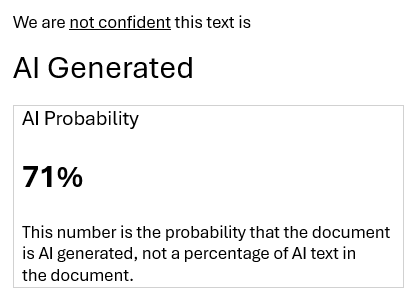
AI Detectors – Many faculty ask about AI Detectors. JHU continues to explore and evaluate AI Detection methodologies, but at this time does not recommend incorporating AI Detection into your student evaluations. The technology is not reliable enough and often reports a vague probability of AI use. The reports do not include clear evidence like a plagiarism report from Turnitin. Various tests generated false positives or inaccurate assessments. The CTEI can help design AI resistant assignments and evaluations.
In summary, here are questions for reflections based on the previous information.
- How might AI change the way students approach learning in my course?
- How can I integrate AI into my course in such a way that supports my objectives?
- What AI tools are most appropriate for my course?
- What guidance will I provide to students on the ethical and responsible use of AI?
- How will I ensure that AI use in my course is equitable and accessible to all students?
- As an instructor, in what ways will I use AI and how will I communicate this to students?
How can CTEI help me?
The CTEI team can help faculty learn about different AI-powered tools and explore instructional uses in their courses. Staff are also available to talk about academic integrity concerns. Our Educational Technology team is familiar with many commonly used tools and how they are implemented by other faculty across JHU. We offer discussions and trainings around AI tools (along with other topics) and can meet one-on-one to discuss any specific needs or design issues. Email [email protected] to start a conversation.
Also consider consulting these websites for additional information.
- Guidelines for Teaching in the Age of Generative AI – Teaching @ JHU
- Guidelines for Writing Assignments – JHU University Writing Program
- Integrating AI into course lessons – Innovative Instructor Blog Post
- Developing course materials – Innovative Instructor Blog Post
Training on AI
For instructional training on using AI for teaching and learning, see the Teaching Academy Events website, which lists training from CTEI and other groups across all divisions of Hopkins.
For guidance on using AI for research and scholarship, see the Sheridan Libraries website on researching with AI.
Last updated 7/9/26